
Menu

Connect your WhatsApp number
Meta's official sign-up, in a pop-up, in about five minutes.
1 min read 5 steps
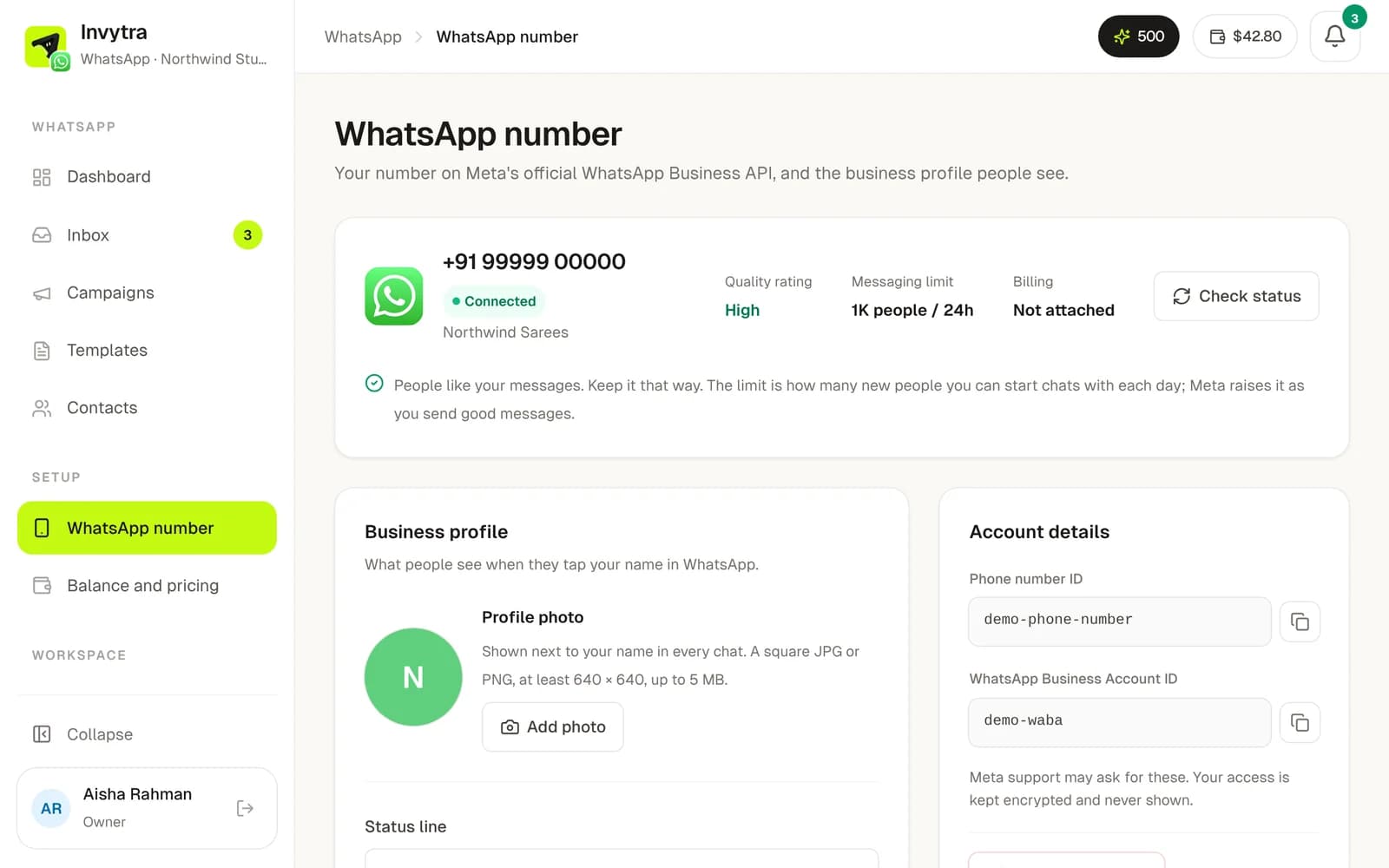
Invytra uses the official WhatsApp Business API from Meta, so your number is never at risk of a ban for using a tool.
Before you start
- A phone number that can get an SMS or call. It must not be on the WhatsApp or WhatsApp Business app; if it is, delete that account in the app first, or use a new number.
- A Facebook account (yours) to log in to Meta.
- Your business name and website, as you want customers to see them.
Connect
- 1In WhatsApp, open WhatsApp number and click Connect WhatsApp.
- 2Log in to Facebook in Meta's pop-up and choose (or create) your business portfolio.
- 3Enter the display name customers will see and add the phone number. Meta sends a code to it; enter it.
- 4When the pop-up closes, the number shows Connected with its quality rating and daily limit.
- 5Add a profile photo and description under Business profile.
Limits and quality
- A new number can start conversations with about 250 new people a day. Meta raises it (1K, 10K, 100K) as you send good messages.
- Quality (High, Medium, Low) comes from how people react. Blocks and reports lower it; low quality can get the number restricted.
- Replies to people who wrote to you don't count against the limit.
Was this page helpful?